Showing posts with label Blogger How To. Show all posts
Showing posts with label Blogger How To. Show all posts
Saturday, 17 November 2012

How To Submit Blogger Blog To Google (Search Engine)
 Google Webmaster Is A Service From Google For Webmaster. To Index Their Website In Google Search Engine. Your Easily Check Indexing Status And Optimize Website Visibility In Search Results.
Google Search Is The Best Way To Increase Traffic Without Paying Bucks. The Best Thing Is That Traffic Is Real. Visitor Come To Your Blog For What They Need, If Your Blog Content On Same Niche Then May Be Visitor Bookmark Your Blog. Follow These Steps To Add Your Blogger Blog To Google.
Monday, 12 November 2012
Add a Diwali Wishing Widget to Blogger Blogs
 Wishing all of you a very happy Diwali.I've tried to create a blogger widget which will let you wish your visitors and friends a very happy diwali.This creates a better impression on your blog visitors also this helps in seo also from some ways.As we all know the importance of festivals in our life and specially diwali for all indians.We'll not describe why do we celebrate this just getting on how to add this
Tuesday, 6 November 2012
How to Add Facebook Comment Box to Blogspot Blogs
 Facebook have released many of the resources and plugins for bloggers. In the whole plugins of Facebook, LIKE and Share were the most inspired one. Now they have released Facebook comment form for bloggers on which I am going to give the tutorial today. It helps Bloggers to get more exposure to from Social Media. This Facebook comment plugin looks simple, cool and it allows users to comment on your blog by logging into Facebook, Yahoo, AOL and Hotmail.Lets Move on to The Tutorial.
Monday, 5 November 2012
How to Disable Copy text option in Blogger
Disable Select all Text For Sites
 In my previous post i've posted how to disable right click on blogs to protect your content from thieves.This time i want my readers to know how to protect your hardwork put on creating a beautiful,eye catchy,and contentful blog post from content thieves.This post will teach you about how to disable copy and paste function on your blog or website.
 In my previous post i've posted how to disable right click on blogs to protect your content from thieves.This time i want my readers to know how to protect your hardwork put on creating a beautiful,eye catchy,and contentful blog post from content thieves.This post will teach you about how to disable copy and paste function on your blog or website.
Sometimes this trick may not be compatible with some old browsers.But,we will see how to make content more secure in my future posts.
Sunday, 4 November 2012
How to Disable right Click on Blogspot Blogs
 Have you got tired of watching your content is being distributed by content theives or by your own blog readers.The reason is because of right click enabled on your blog which lets them to copy content from your blog.Content theft have become common these days.However,i also have seen my content being distributed by some of my regular blog readers.Now i've got a great tool to stop my content from being robbed.Without wasting time i'm going to inform how to install the widget.
How to Get Adsense Approval Faster?
Google Adsense is the most popular and probably the Best way to earn money online with blogging. But If you think that it is easy, then you might be wrong. Google Adsense can only be used If Google Approves you and Believe me getting approved by Google is one of the toughest thing for some people.

Read More...
Saturday, 3 November 2012
How to Add Subscription Box Below every Post?
How to add Floating Facebook Like Box to Blogspot Blogs

How to add Floating Twitter widget to Blogspot Blog

Thursday, 25 October 2012
How to add Simple Subscribe Via Email widget to Blogspot Blog
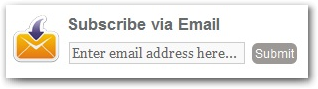
Today's tutorial is about how to add a simple subscribe via email widget to your blogspot widget.Subscription widgets allows your visitors to subscribe to your post feed updates and get their feeds updates daily directly to their email inbox.This time i'm sharing a beautiful and simple subscription widget to your blogger blog.The Follow steps will guide you how to add this widget:
- Go to Blogger Dashboard-->Layout-->Add a Gadget-->Html/Java Script
- Just Copy and paste the Below code into the content box
<style>.rb-email{background:url(https://blogger.googleusercontent.com/img/b/R29vZ2xl/AVvXsEiVY41Xj-p8oqE03uE9hRDIt-RLi7NeuizGLGhSNXa39R0j9KZSI8Teu-E61QrdDO6pP_Rm7Cg338zKHc6A2dmsvDTf4GR-rVqUvB3gyH6VIVG7IcsgdbK-HaS1r4bsbKHAnNBmVvUQjSBx/s1600/email.png) no-repeat 0px 12px ;width:300px;padding:10px 0 0 55px;float:left;font-size:1.4em;font-weight:bold;margin:0 0 10px 0;color:#686B6C;}
.rb-emailsubmit{background:#9B9895;cursor:pointer;color:#fff;border:none;padding:3px;text-shadow:0 -1px 1px rgba(0,0,0,0.25);-moz-border-radius:6px;-webkit-border-radius:6px;border-radius:6px;font:12px sans-serif;}.rb-emailsubmit:hover{background:#E98313;}.textarea{padding:2px;margin:6px 2px 6px 2px;background:#f9f9f9;border:1px solid #ccc;resize:none;box-shadow:inset 1px 1px 1px rgba(0,0,0,0.1);-moz-box-shadow:inset 1px 1px 1px rgba(0,0,0,0.1);-webkit-box-shadow:inset 1px 1px 1px rgba(0,0,0,0.1); font-size:13px; width:170px;color:#666;}
</style>
<div class="rb-email">Subscribe via Email<form action="http://feedburner.google.com/fb/a/mailverify" id="feedform" method="post" target="popupwindow" onsubmit="window.open('http://feedburner.google.com/fb/a/mailverify?uri=Best Blogger Tutorials', 'popupwindow', 'scrollbars=yes,width=550,height=520');return true"><input gtbfieldid="3" class="textarea" name="email" onblur="if (this.value == "") {this.value = "Enter email address here...";}" onfocus="if (this.value == "Enter email address here...") {this.value = "";}" value="Enter email address here..." type="text" /><input type="hidden" value="Fbtrack" name="uri"/><input type="hidden" name="loc" value="en_US"/><input class="rb-emailsubmit" value="Submit" type="submit" /></form></div>
- To Change you Subscription Widget Header,change Subscribe via Email
- Replace Fbtack with your feed title/username
Save your Widget and You are Done!!!!!!!!!
